Insights
It proposes. You decide.
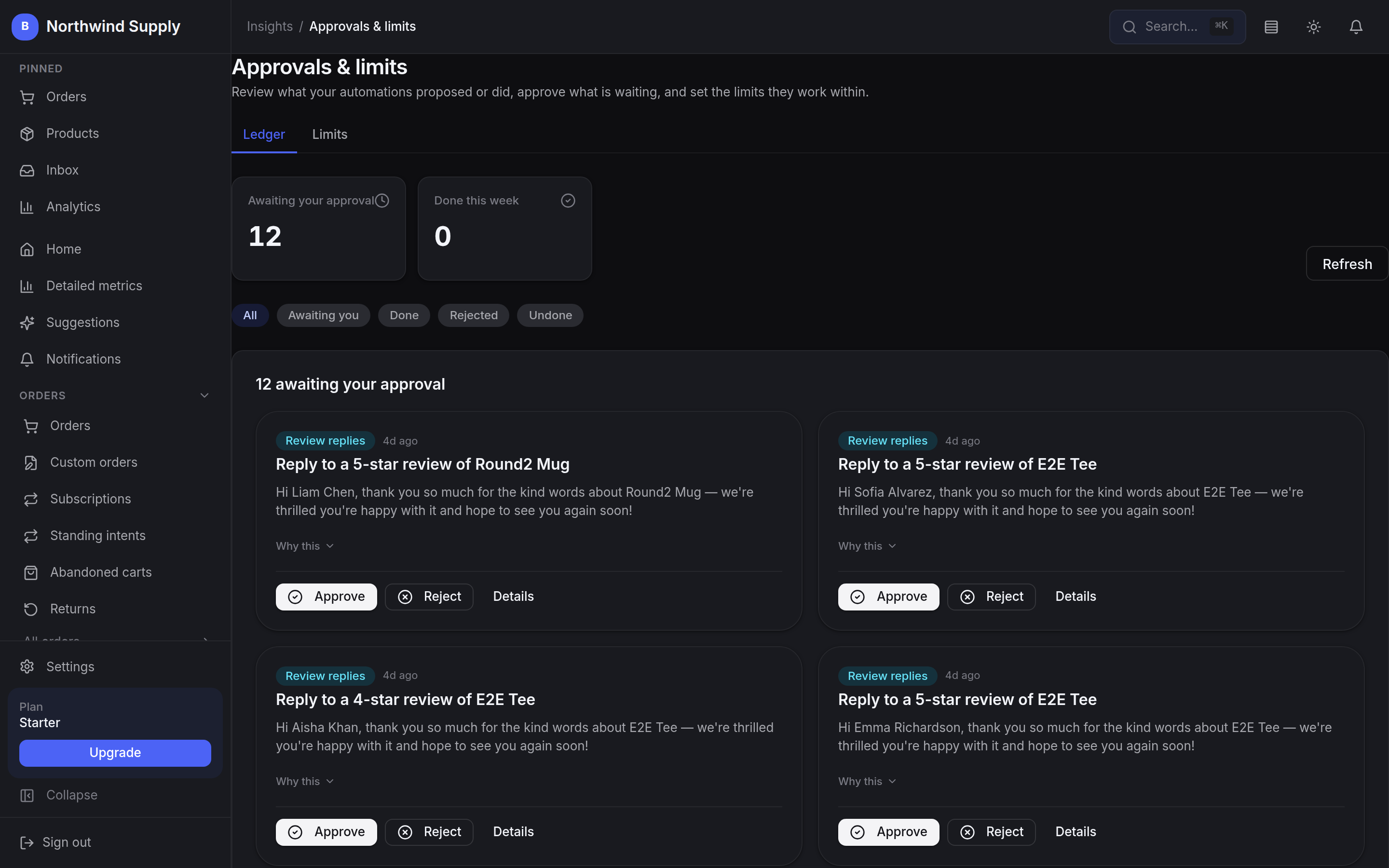
BestWebby watches the shop against rules you set, drafts the work those rules imply, and then stops — everything waits in one ledger with its reasoning attached until you approve or reject it. That is the setting every action starts on, and only you can move it: raise a kind of work to run on its own and it still obeys the spend caps you set, still records what it did, and stays reversible for as long as you choose.
- Live from signup
- Day 1
- No data team, no API keys, no pipelines to maintain
- Setup steps
- 0
- It reads the catalogue and orders you already have
- The setting every action starts on
- Approve
- Draft for anything that moves money, until an owner says otherwise
- Audit trail on every action
- Full
- What was proposed, what you chose, and when
How it reaches you
A queue, not a black box.
Anything that could change a price, send a message or hold an order takes the same four steps — and unless you have raised that kind of work yourself, the third one is you.
These capabilities are wired straight into your live catalogue, order history and pricing rather than bolted on beside them. That is what makes a proposal specific enough to be worth reading — and specific enough to argue with.
- 01
Proposed
A rule you set matches something in the shop — a price worth moving, a reply worth sending, an order worth holding — and a proposal is drafted.
- 02
Explained
It arrives with its reasoning attached. “Why this” opens up the signals behind it, so you are never asked to approve something you cannot check.
- 03
Decided
You approve or reject. On the default setting nothing leaves the queue without you, and anything falling outside the limits you set waits for you even after you have raised the level.
- 04
Recorded
The decision is written to the audit trail with the account that made it, so a month later you can still see who chose what.
What is in it
Eight things worth a second pair of eyes.
Two of them are the gate itself — the ledger every proposal lands in, and the levels and caps you set around it. The other six read your own data and hand you something you can act on rather than a dashboard to interpret.
Pricing rules
RevenueRules you define — a daily window of hours, a quantity in the cart, low stock — that move prices for you instead of by hand, with a line on the page saying why.
Checkout charges the price the page shows, and a low-stock rule never rises past the ceiling you set.
Growth plan and above.
Levels, caps and undo
ControlEach kind of action — a markdown, a purchase order, a review reply, a fraud hold — carries its own setting: draft only, approve each, automatic with an undo window, or fully automatic. Alongside it sit a daily and a per-action spend cap, and only an owner can change any of it.
Raising a level is a decision you make; over-cap work still waits in the queue.
One ledger for the lot
OperationsEverything the shop proposes lands in the same ledger with the signals that drove it — awaiting you, approved, done, rejected, undone or expired — and each row is signed, so the trail cannot be quietly rewritten.
One place to see what is waiting, what ran, and what you reversed.
Order risk scoring
RiskOrders are scored from 0 to 100 by a deterministic rules engine, built from order value, a missing shipping address, unusual order timing and bulk quantities. Signals have to corroborate before an order is held, so one flag never blocks a good customer.
A hold is proposed for your approval, and it pauses fulfilment rather than cancelling the order.
Growth plan and above.
Reorder signals
StockSales velocity and sell-through per SKU, read from your own history — flagging the slow movers worth clearing and the fast ones heading for a stockout.
Reorder before demand hits, grounded in what you have actually sold.
Growth plan and above.
Churn flags
RetentionSurfaces customers showing early signs of drifting away: falling engagement, longer gaps between orders, smaller baskets — and drafts a win-back campaign for you to review.
Reach the ones slipping away while it still counts as retention.
Growth plan and above.
Board-ready report
ReportingGenerate a board-style write-up of your last thirty days: an executive summary, your key metrics marked good, concern or critical, three risks, three opportunities, and a priority list for the next thirty days. Each one is kept, so you can read this month against the last.
A plain-language read on the business, built from your own data.
Growth plan and above.
Search demand signals
GrowthSuggests keywords likely to trend in your category over the next thirty days, reasoned from your own catalogue plus the seasons, holidays and shopping events ahead, each with a trend score and an expected peak.
Draft the content before the search demand arrives, not after.
Growth plan and above.
No configuration
Nothing to switch on first.
There is no model to train, no warehouse to fill and no integration to commission. It reads the catalogue, orders and settings already in your account, and starts proposing from there.
Included, not metered
The approvals ledger, the levels and the spend caps are on every plan, Starter included. There is no per-suggestion charge and no separate bill when the shop gets busier.
Several of the engines that feed the ledger need Growth or above — each card above says which. Every proposal and every decision is written to the audit trail, whichever plan you are on.
Keep the judgement. Lose the busywork.
The rules are yours, the limits are yours, and how much runs without you is yours to set — one kind of work at a time. What changes is that the shop stops relying on someone noticing in time.