BestWebby vs WooCommerce
A platform, not a plugin stack to maintain.
WooCommerce has no licence fee and is self-hosted — if you are willing to run WordPress, pick and update the plugins, and own the security and the uptime. BestWebby gives you that depth as a managed platform: the register, wholesale accounts, purchasing and recalls native, hosted and patched for you, with your domain, your data and your gateway staying yours.
- Servers, plugins or certificates to patch
- Zero
- Hosting, SSL and updates are ours
- Added transaction fees
- 0%
- The charge is made on your own Stripe account
- Subscription instead of a plugin bill
- One
- And one system to learn
An honest take
A difference of model, not of ambition.
WooCommerce is open-source software you host. You choose the server, the certificate, the backup schedule and the dozen plugins that turn a catalogue into an operation — and you own what happens when one of them updates badly on a Friday.
BestWebby delivers that depth as a managed platform: the register, wholesale accounts, purchasing and recalls native, hosted and patched for you, with support attached. Your data, your domain and your payments stay yours and stay portable. What you trade away is server access; what you stop doing is running, patching and stitching the stack together.
Capability by capability
What you run, and what we run.
WooCommerce is self-hosted by design, so the right-hand column mostly describes what the model leaves with you. Where it is genuinely native there too, the row says so. On our side, a tick means it is part of the platform; where a capability is included from a higher plan up, the row says which.
What you would otherwise run yourself
Hosting, SSL certificates and backups
WooCommerce is software you host, so the server, the certificate and the backups are yours to buy and to run.
- BestWebby
- Built in
- WooCommerce
- You provide
Security patching and version upgrades
WordPress core, the plugin stack and the interactions between them update on your schedule, not ours.
- BestWebby
- Built in
- WooCommerce
- Your responsibility
Uptime, monitoring and support when something breaks
- BestWebby
- Built in
- WooCommerce
- Your responsibility
Added platform fee on your sales
Neither takes a share of your sales. The difference is what sits around it: on BestWebby the hosting, the updates and the support are already inside the same subscription rather than arriving as separate bills.
- BestWebby
- 0%
- WooCommerce
- 0%
Sell everywhere
Point of sale with offline mode, split tender and staff PINs
On every plan. A sale rung up with no signal is saved on the till and syncs once when the connection returns.
- BestWebby
- Built in
- WooCommerce
- Plugin required
Shop floor and web selling from one stock ledger
A register sale and a web sale move the same stock row, in the same transaction. Splitting that stock across several locations is included from the Growth plan up.
- BestWebby
- Built in
- WooCommerce
- Plugin required
Buy online, pick up in store
- BestWebby
- Built in
- WooCommerce
- Plugin required
B2B accounts with price lists, credit limits and net terms
Scale plans and above
- BestWebby
- Built in
- WooCommerce
- Plugin required
Subscriptions and recurring orders
Growth plans and above
- BestWebby
- Built in
- WooCommerce
- Plugin required
Dropship and affiliate results under a search that comes up short
Growth plans and above
Network Search, with your own CJ Dropshipping, AliExpress or Amazon Associates account. Dropship items are bought through your normal checkout at your margin, and the supplier order is placed through your account after payment; Amazon items link out with your partner tag. BestWebby takes no fee on these sales.
- BestWebby
- Built in
- WooCommerce
- Plugin required
Appointment booking with deposits and reminders
Growth plans and above
Services, staff hours and time off, and a booking page on your storefront that offers only open times. A deposit or the full price is taken through your own Stripe account with your store’s tax rules, and customers get reminders and a private link to cancel or move the booking within your policy.
- BestWebby
- Built in
- WooCommerce
- Plugin required
Run the operation
Proposals that wait in one queue for your approval
Every proposal shows what it would do and why, with Approve, Reject and an undo window, per-task limits you set, and a ledger of who decided what. The queue and its limits are on every plan; what fills it follows the capability — the markdown, stock and risk rows here.
- BestWebby
- Built in
- WooCommerce
- Plugin required
Purchase orders and supplier management
Growth plans and above
- BestWebby
- Built in
- WooCommerce
- Plugin required
Recalls that freeze the stock, trace the buyers and notify them
Scale plans and above
Name the affected SKUs and batch: BestWebby freezes them, builds a case per buyer from the orders that contain them, emails each one a private link, and records who acknowledged it.
- BestWebby
- Built in
- WooCommerce
- Plugin required
Markdown scheduler with a price floor and an approval gate
Growth plans and above
- BestWebby
- Built in
- WooCommerce
- Plugin required
Unified customer inbox with SLA timers and CSAT surveys
Growth plans and above
- BestWebby
- Built in
- WooCommerce
- Plugin required
Risk signals on the order line, with a hold you approve
Growth plans and above
The score sits on the order row and a proposed hold — reversible, and only ever a pause on fulfilment — waits in the approvals queue. Nothing is cancelled or refunded on your behalf.
- BestWebby
- Built in
- WooCommerce
- Plugin required
Own your setup
Mailbox on your own domain for store email
WordPress hosting rarely includes mailboxes. BestWebby provisions one at your domain and DKIM-signs what your store sends.
- BestWebby
- Built in
- WooCommerce
- You provide
Pages, blogging and SEO controls
Both publish content. On BestWebby the pages, the blog and the catalogue are one system behind one login, so there is nothing to keep in sync between them. Pages and SEO controls are on every plan; the blog is included from the Growth plan up.
- BestWebby
- Built in
- WooCommerce
- Native too
Your data, domain and gateway stay portable
Both are portable. BestWebby charges on your own Stripe account, and one action in Settings writes every record the platform holds for your store to a single archive — with CSV for the catalogue, customers and orders alongside it.
- BestWebby
- Built in
- WooCommerce
- Native too
API over your products, orders, customers and stock
Both expose an API. Ours reads products, orders, customers and stock; creates, updates and archives products, adjusts stock, fulfils orders and manages webhook subscriptions — scoped keys, cursor pagination, signed webhooks for what changes. Customers and orders are not created through it. There is no plugin server of your own to keep patched behind it.
- BestWebby
- Built in
- WooCommerce
- Native too
| Capability | BestWebby | WooCommerce |
|---|---|---|
| What you would otherwise run yourself | ||
| Hosting, SSL certificates and backupsWooCommerce is software you host, so the server, the certificate and the backups are yours to buy and to run. | Built in | You provide |
| Security patching and version upgradesWordPress core, the plugin stack and the interactions between them update on your schedule, not ours. | Built in | Your responsibility |
| Uptime, monitoring and support when something breaks | Built in | Your responsibility |
| Added platform fee on your salesNeither takes a share of your sales. The difference is what sits around it: on BestWebby the hosting, the updates and the support are already inside the same subscription rather than arriving as separate bills. | 0% | 0% |
| Sell everywhere | ||
| Point of sale with offline mode, split tender and staff PINsOn every plan. A sale rung up with no signal is saved on the till and syncs once when the connection returns. | Built in | Plugin required |
| Shop floor and web selling from one stock ledgerA register sale and a web sale move the same stock row, in the same transaction. Splitting that stock across several locations is included from the Growth plan up. | Built in | Plugin required |
| Buy online, pick up in store | Built in | Plugin required |
| B2B accounts with price lists, credit limits and net termsScale plans and above | Built in | Plugin required |
| Subscriptions and recurring ordersGrowth plans and above | Built in | Plugin required |
| Dropship and affiliate results under a search that comes up shortGrowth plans and aboveNetwork Search, with your own CJ Dropshipping, AliExpress or Amazon Associates account. Dropship items are bought through your normal checkout at your margin, and the supplier order is placed through your account after payment; Amazon items link out with your partner tag. BestWebby takes no fee on these sales. | Built in | Plugin required |
| Appointment booking with deposits and remindersGrowth plans and aboveServices, staff hours and time off, and a booking page on your storefront that offers only open times. A deposit or the full price is taken through your own Stripe account with your store’s tax rules, and customers get reminders and a private link to cancel or move the booking within your policy. | Built in | Plugin required |
| Run the operation | ||
| Proposals that wait in one queue for your approvalEvery proposal shows what it would do and why, with Approve, Reject and an undo window, per-task limits you set, and a ledger of who decided what. The queue and its limits are on every plan; what fills it follows the capability — the markdown, stock and risk rows here. | Built in | Plugin required |
| Purchase orders and supplier managementGrowth plans and above | Built in | Plugin required |
| Recalls that freeze the stock, trace the buyers and notify themScale plans and aboveName the affected SKUs and batch: BestWebby freezes them, builds a case per buyer from the orders that contain them, emails each one a private link, and records who acknowledged it. | Built in | Plugin required |
| Markdown scheduler with a price floor and an approval gateGrowth plans and above | Built in | Plugin required |
| Unified customer inbox with SLA timers and CSAT surveysGrowth plans and above | Built in | Plugin required |
| Risk signals on the order line, with a hold you approveGrowth plans and aboveThe score sits on the order row and a proposed hold — reversible, and only ever a pause on fulfilment — waits in the approvals queue. Nothing is cancelled or refunded on your behalf. | Built in | Plugin required |
| Own your setup | ||
| Mailbox on your own domain for store emailWordPress hosting rarely includes mailboxes. BestWebby provisions one at your domain and DKIM-signs what your store sends. | Built in | You provide |
| Pages, blogging and SEO controlsBoth publish content. On BestWebby the pages, the blog and the catalogue are one system behind one login, so there is nothing to keep in sync between them. Pages and SEO controls are on every plan; the blog is included from the Growth plan up. | Built in | Native too |
| Your data, domain and gateway stay portableBoth are portable. BestWebby charges on your own Stripe account, and one action in Settings writes every record the platform holds for your store to a single archive — with CSV for the catalogue, customers and orders alongside it. | Built in | Native too |
| API over your products, orders, customers and stockBoth expose an API. Ours reads products, orders, customers and stock; creates, updates and archives products, adjusts stock, fulfils orders and manages webhook subscriptions — scoped keys, cursor pagination, signed webhooks for what changes. Customers and orders are not created through it. There is no plugin server of your own to keep patched behind it. | Built in | Native too |
- Part of the platform — nothing to buy or install
- Native on WooCommerce as well
- Growth · ScaleThe plan a capability is included from, where that is above the first one
The WooCommerce column describes the self-hosted model as it ships: “Plugin required” means the capability comes from an extension rather than from WooCommerce core. It is not a statement about what any extension costs. Where our column names a plan, that is the plan the capability is included from — it still arrives as part of the platform, with nothing extra to install or keep updated.
In the product
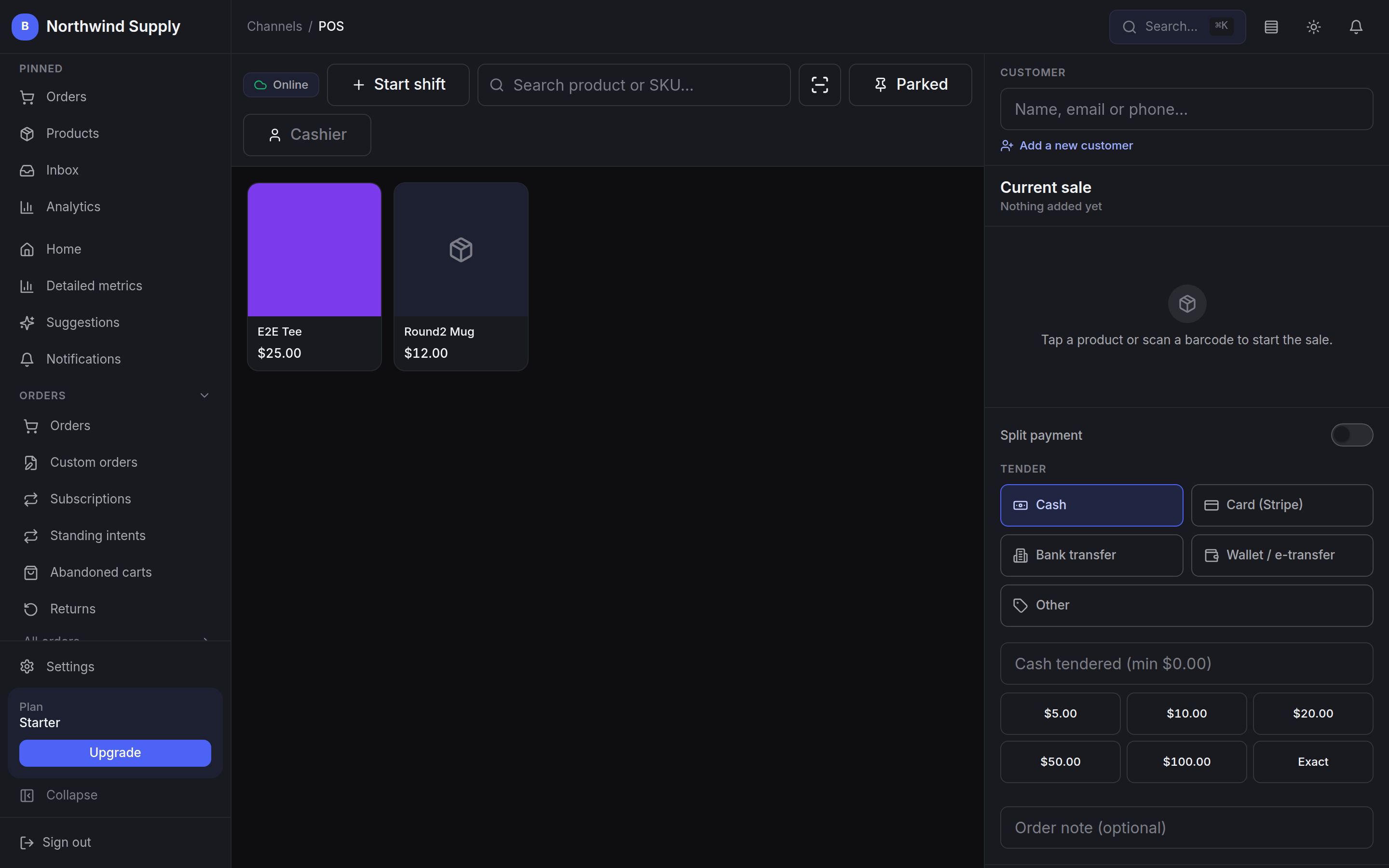
The register is not a plugin.
Shift open and close, customer lookup, split payment and cash tendering run on the same catalogue and the same stock as the storefront — so a sale on the counter and a sale on the web move the same stock row, with nothing to install and nothing to sync.
In the product
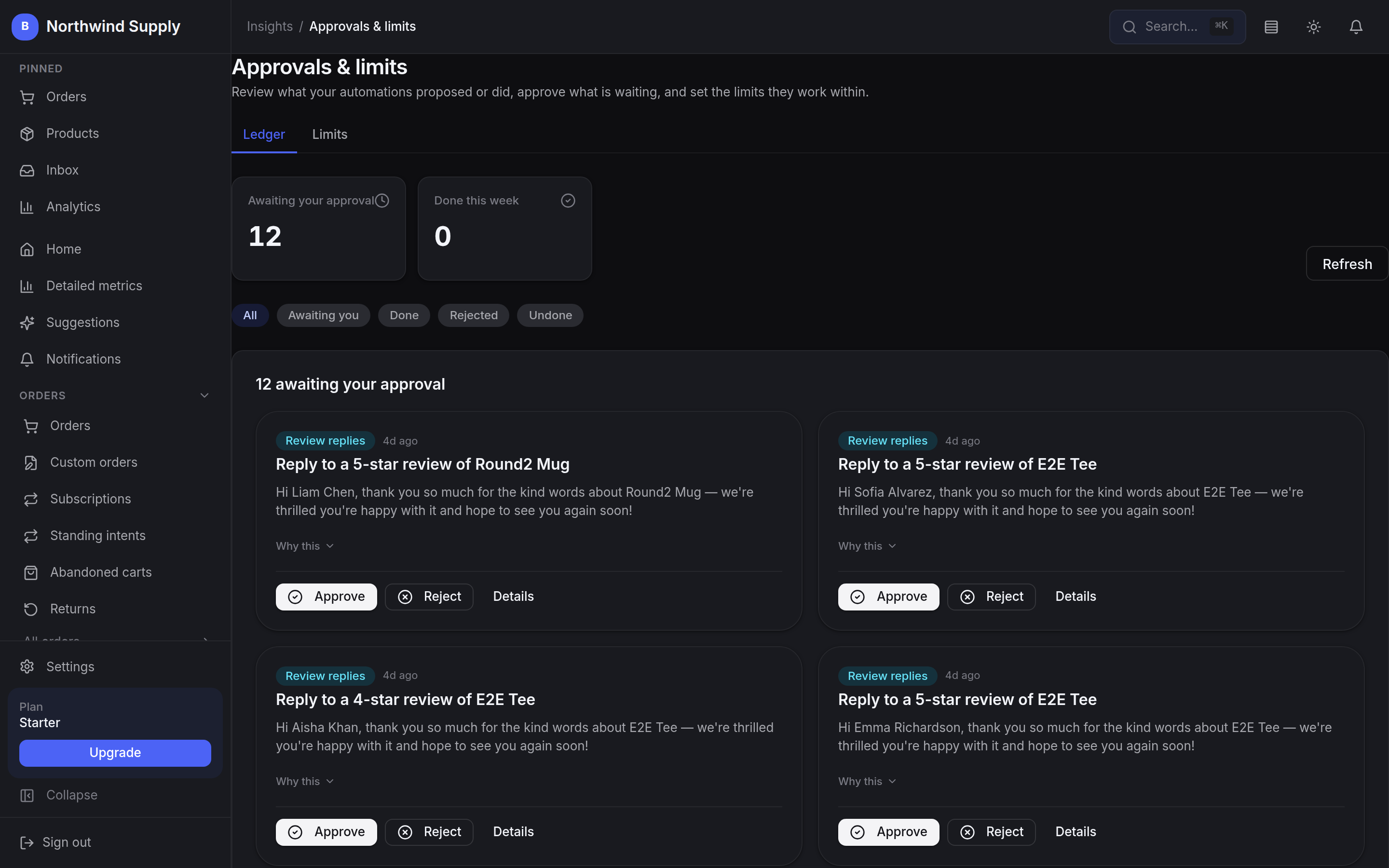
Nothing moves until you say so.
The queue behind the approval row above, and part of the platform rather than one more extension to choose and keep current. Every proposal lands here with what it would do and why, and it waits: approve it, reject it, or open the detail. The second tab is where you set how far each task may go on its own.
The math
The bill for a production store, line by line
WooCommerce has no licence fee, and that is the number everyone quotes. A production store is a different bill: hosting, certificates, backups, the premium extensions that add the register, subscriptions and security, and the hours somebody spends keeping the stack current. The honest comparison is total cost of ownership with your time counted in — and that is the number BestWebby folds into one managed price. Ours starts with the Starter plan at US$15 a month plus tax, no setup fee, with unlimited products included; higher plans add storefronts and team members.
Monthly cost lines
IllustrativeSoftware licence
- BestWebby
- From $15
- WooCommerce
- $0
Hosting, SSL and backups
- BestWebby
- Included
- WooCommerce
- $30–80
Extensions for register and subscriptions
- BestWebby
- Included
- WooCommerce
- $60–120
Updates, patching and uptime
- BestWebby
- Included
- WooCommerce
- Your hours
Estimated monthly total
- BestWebby
- From $15
- WooCommerce
- $90–200+
Card processing is billed by your own processor at your own rate. We do not mark it up and we do not add a platform fee on top of it.
Moving from WooCommerce?
Export your catalogue to CSV and import it — one product per row, columns auto-detected, everything created as a draft so you review before publishing. Build the storefront and run a test purchase through it before you touch DNS: your WooCommerce store keeps selling right up to the moment you point the domain across.